From Vibes to Production
Evaluating and shipping agents that work

What are we talking about?
- What is an eval, and why you need them
- Setting up tracing with Arize AX
- Building an AI agent with the Claude Agent SDK
From data to evals
- Looking at your data: error analysis
- Code evals and built-in LLM evals
- Writing custom eval rubrics
- Meta-evaluation: testing your tests
From evals to experiments
and beyond
- Datasets
- Experiments
- The improvement cycle
Get the notebook

Get set up
- Anthropic API key: console.anthropic.com
- Arize AX account: arize.com (start a free trial)
- Arize Space ID — in your AX workspace settings
- Arize API key — generate one in Settings
What is Arize AX?
- Arize's AI observability and evaluation platform
- Captures traces, runs evals, monitors production
- Hosted for you — no infrastructure to manage
What is an eval?
Traces are logs, evals are tests
- Traces = logs, for AI
- Evals = tests, for AI
Spans: the building blocks
The vibes problem
What you can't do without evals
- Can't detect regressions when you change a prompt
- Can't compare prompt versions objectively
- Can't know if a new model is actually better
- Can't run quality gates in CI
You can't switch models
without evals
- New models drop every few months
- Without evals, switching = weeks of manual testing
- With evals, you know within hours
This is not theoretical
Descript, Bolt, Claude Code — all followed the same arc
Two types of evals
- Code evals — deterministic, free, fast
- LLM-as-a-judge — semantic, flexible, powerful
LLM-as-a-judge evals
- A second LLM grades outputs against a rubric
- Handles meaning, not just strings
- Non-deterministic — needs calibration
LLM judges: tradeoffs
When to use which
- Code evals → format, structure, constraints
- LLM judge → accuracy, relevance, tone, faithfulness
- Human review → novel failures, calibrating judges
Why agents make this harder
- Single LLM call: input → output. Done.
- Agent: input → tool call → result → reasoning → another tool call → output
- Errors cascade. Each step can go wrong.
Multi-agent complexity
- Handoffs between agents add another layer
- Triage routing, specialist handling
- Each layer = new ways things can go wrong
Cascading failures
- Bad retrieval → bad reasoning → confidently wrong output
- The user sees a polished response and trusts it
- This is worse than an obvious failure
Creatively correct vs. wrong
- Sometimes the agent finds a better solution
- Your eval says "fail" — but the agent was right
- Evals need to distinguish creative from wrong
Another way to categorize evals
- Capability evals: can it do this new thing?
- Regression evals: can it do the stuff it used to do?
What an eval result looks like
Code eval:  score: 1 · label: "valid"
LLM judge:  score: 0 · label: "incorrect"
            explanation: "The response fails to include..."
What a real explanation looks like
label: "incorrect"
explanation: "The response fails to include a budget
breakdown, which is a core requirement. The agent
provides destination info and local recommendations
but omits all cost estimates, making the plan
incomplete for a user who asked specifically
about budget travel to Tokyo."
Explanations make evals actionable
- Concrete failure → you know what to fix
- Same explanation across 50 traces = systematic problem
- Evals become a debugging tool, not just a scoreboard
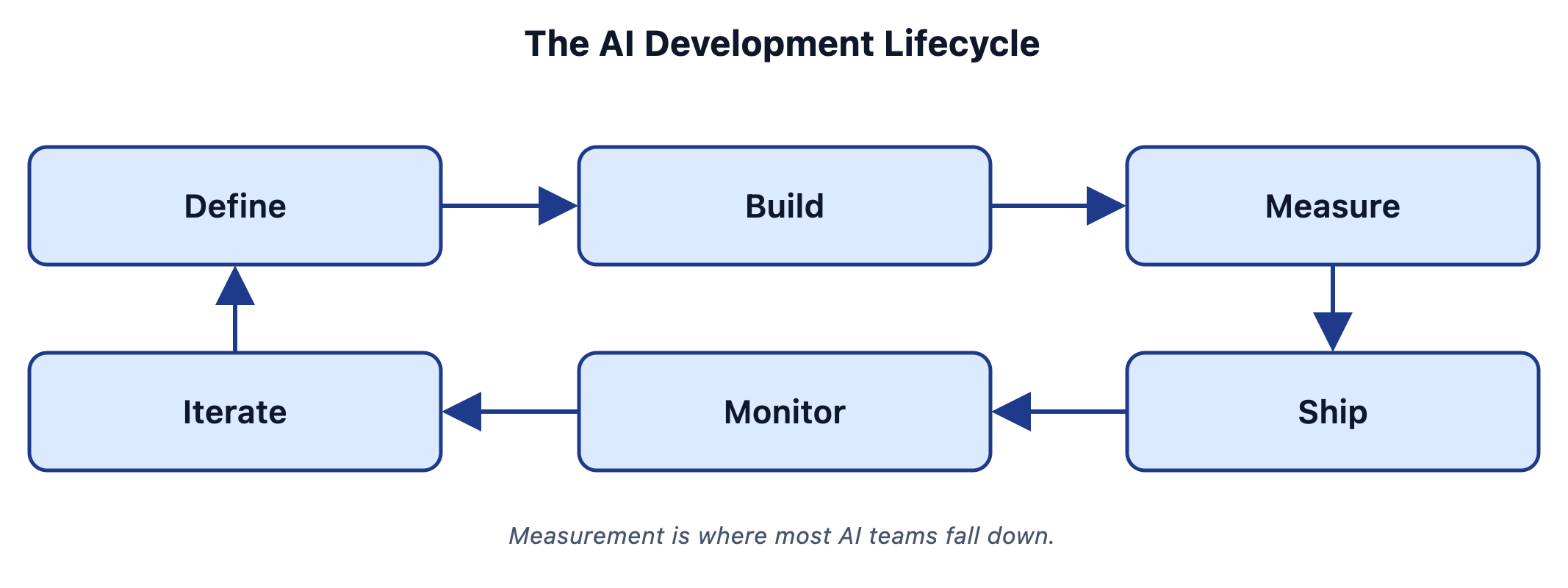
The full loop
Setting up tracing
Open the notebook
Install dependencies
%pip install claude-agent-sdk
  openinference-instrumentation-claude-agent-sdk
  arize arize-otel arize-phoenix anthropic
The Claude Agent SDK
- Anthropic's framework for building agents
- Tool use, web search, conversation context
- Auto-instrumented by OpenInference
Set your keys
os.environ["ANTHROPIC_API_KEY"] = "sk-ant-XXXX"
os.environ["ARIZE_API_KEY"]     = "YYYY"
os.environ["ARIZE_SPACE_ID"]    = "ZZZZ"
Register the tracer
from arize.otel import register, Endpoint
tracer_provider = register(
    space_id=..., api_key=...,
    project_name="aie-financial-demo",
    endpoint=Endpoint.ARIZE,
    batch=False,
)
ClaudeAgentSDKInstrumentor().instrument(
    tracer_provider=tracer_provider)
Why this works so smoothly
Set up the AX client
from arize import ArizeClient
arize_client = ArizeClient(api_key=...)
SPACE_ID = os.environ["ARIZE_SPACE_ID"]
PROJECT_NAME = "aie-financial-demo"
Even easier: the arize-skills plugin
npx skills add Arize-ai/arize-skills- Works with Claude Code, Cursor, Codex, and many more
- Skills handle instrumentation, evals, datasets, experiments
Build the agent
A financial analysis chatbot
The agent setup
options = ClaudeAgentOptions(
    model="claude-haiku-4-5-20251001",
    allowed_tools=["WebSearch"],
    permission_mode="acceptEdits",
)
The two-turn pattern
RESEARCH_PROMPT = "Research {tickers}. Focus on: {focus}.
    Use web search to find current financial data."
WRITE_PROMPT = "Now write a concise financial report
    based on your research above."
Wrapping it in a span
with tracer.start_as_current_span("financial_report", ...):Run it!
result = await financial_report(
    "TSLA",
    "financial performance and growth outlook"
)
print(result)
Non-deterministic by design
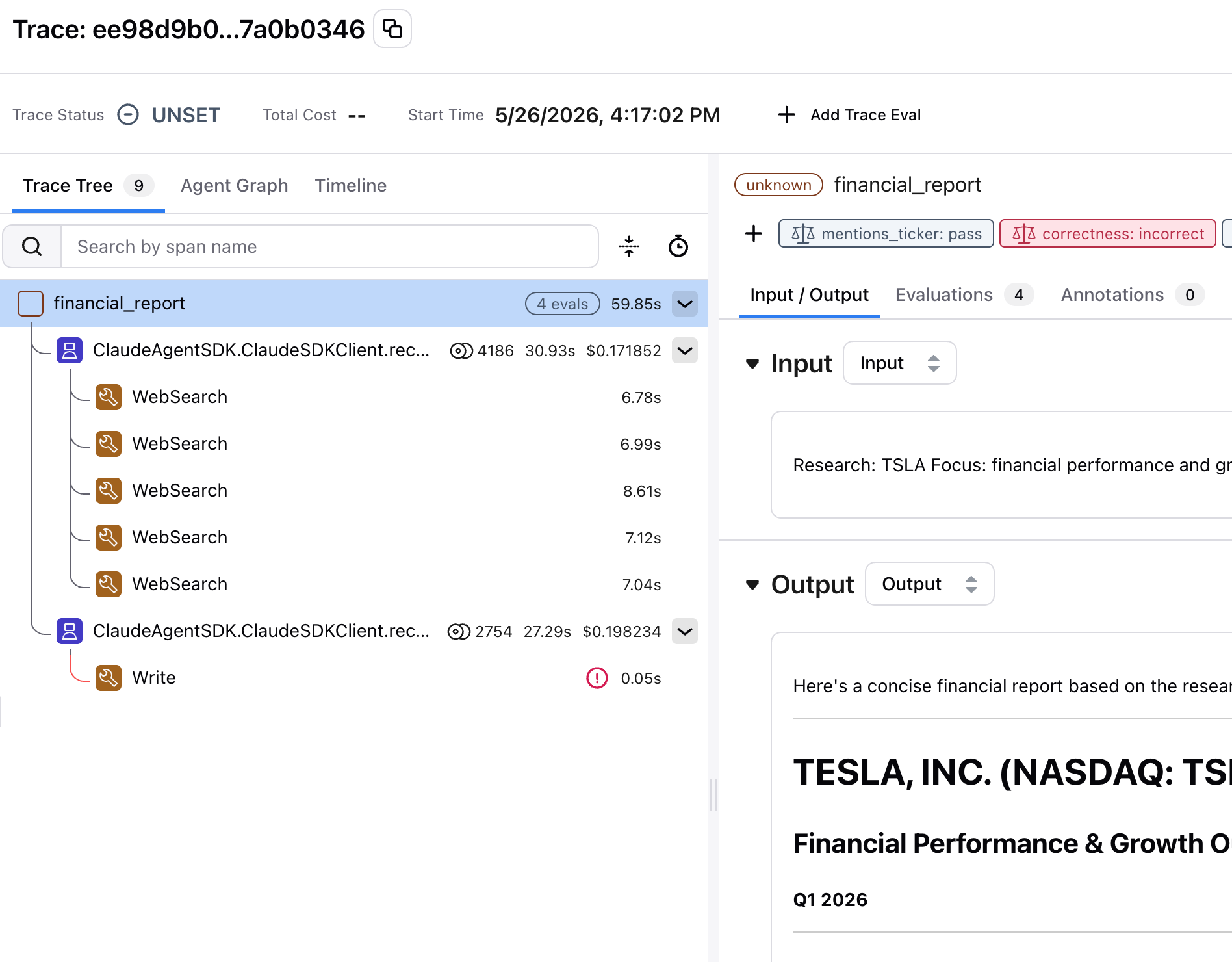
Look at the report
Open the trace in AX
Click into a span
This is observability
Generate test data
Here's one I made earlier
Test queries
test_queries = [
    {"tickers": "AAPL", "focus": "revenue growth"},
    {"tickers": "NVDA", "focus": "AI chip demand"},
    {"tickers": "AAPL, MSFT", "focus": "comparative analysis"},
    {"tickers": "RIVN", "focus": "financial health"},
    {"tickers": "KO", "focus": "dividend yield"},
    ...  # 12 in total
]
Covering the edge cases
Traces are loaded
Start with data, not metrics
Read your traces
before you write evals
You need requirements first
- You can't say "it doesn't work" if you haven't defined what "works" looks like
- Write down explicit success criteria
Defining success is cross-functional work
Where to get test data
- Before production: synthetic data (LLM-generated queries)
- After production: real user queries from traces
- Diversity is critical — vary phrasing, intent, complexity
Don't forget the edge cases
Examine the traces
When the output is
suspiciously short
When the data looks right but isn't
The "confidently wrong" problem
Open coding and axial coding
- Open coding: read data, name what you see, no preconceptions
- Axial coding: group those names into bigger themes
- This is qualitative research, not engineering
Categorize by root cause
- "The response was wrong" — not actionable. Ask *why*.
- Retrieval failure → better search
- Reasoning error → better prompts
- Hallucination → grounding checks
- Scope violation → explicit boundaries
Frequency times severity
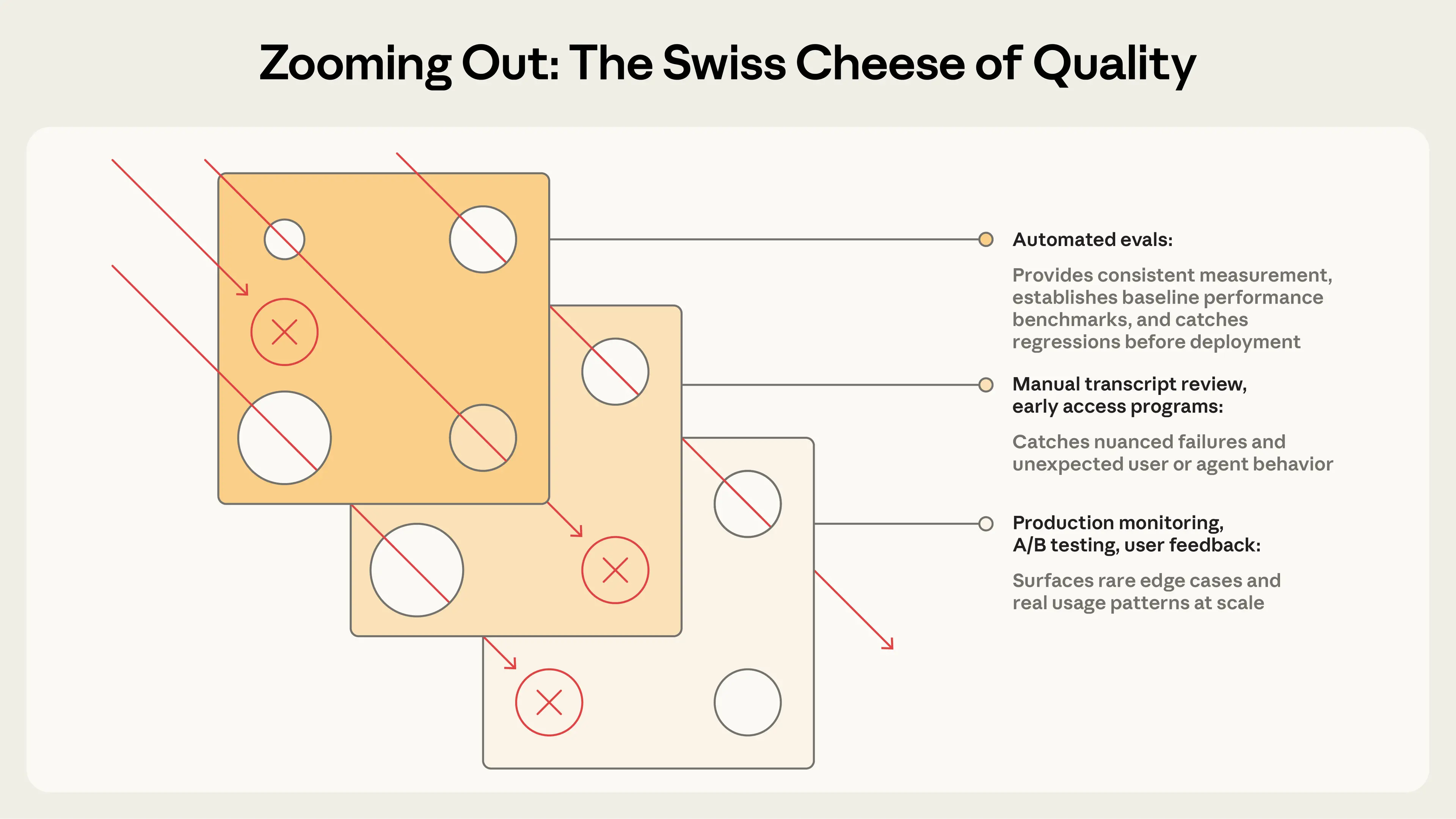
The Swiss Cheese model
Evaluations
The simplest useful eval
Get your spans from AX
spans_df = arize_client.spans.export_to_df(
    space_id=SPACE_ID,
    project_name=PROJECT_NAME,
    start_time=..., end_time=...,
)
parent_spans = spans_df[spans_df["parent_id"].isna()]
Ticker check eval
@create_evaluator(name="mentions_ticker", kind="code")
def mentions_ticker(input, output):
    tickers = re.findall(r"\b([A-Z]{1,5})\b", input)
    ...
    if not missing:
        return {"label": "pass", "score": 1}
    return {"label": "fail", "score": 0,
        "explanation": f"Missing: {', '.join(missing)}"}
Running an online eval
Running the ticker check
with suppress_tracing():
    results = evaluate_dataframe(
        dataframe=parent_spans,
        evaluators=[mentions_ticker])
Log the results back to AX
log_eval_to_ax(results, eval_name="mentions_ticker")
Why this matters
Code evals aren't just toy examples
- Did the output parse as JSON?
- Is the response under 500 tokens?
- Does it avoid forbidden phrases?
Grade the outcome, not the path
- Don't check that the agent followed specific steps
- Agents find valid approaches you didn't anticipate
- Check the outcome, not the trajectory
Built-in LLM evals
What code can't check
Three components
- 1. A judge model (the LLM that grades)
- 2. A prompt template (the rubric)
- 3. Data (the examples being evaluated)
AX ships built-in evals
- Correctness, Faithfulness, Conciseness
- Tool Selection, Tool Invocation
- Document Relevance, Refusal
- No prompt engineering required
Set up the judge
from phoenix.evals.llm import LLM
from phoenix.evals.metrics import CorrectnessEvaluator
llm = LLM(provider="anthropic", model="claude-sonnet-4-6")
correctness_eval = CorrectnessEvaluator(llm=llm)
Run the evaluation
with suppress_tracing():
    correctness_results = evaluate_dataframe(
        dataframe=parent_spans,
        evaluators=[correctness_eval])
Every score is zero
Faithfulness — a better built-in
Giving the judge context
- Correctness: "Is this factually accurate?" (no context)
- Faithfulness: "Does this stick to the source material?" (with context)
- The difference: faithfulness gets the research the agent found
How faithfulness works
- FaithfulnessEvaluator needs three columns:
- input: the user's query
- output: the agent's response
- context: the source material to check against
Run faithfulness
faithfulness_eval = FaithfulnessEvaluator(llm=llm)
with suppress_tracing():
    faith_results = evaluate_dataframe(
        dataframe=spans_with_context,
        evaluators=[faithfulness_eval])
Faithfulness results
Two built-in evals,
two different signals
- Correctness: 0/13 — eval doesn't fit the use case
- Faithfulness: 13/13 — confirms the reports are grounded
- Choosing the right eval matters more than tuning it
Built-in evals are your starting point
Custom eval rubrics
The structure of a good rubric
- The AX docs recommend four parts:
- 1. Define the judge's role
- 2. Explicit pass / fail criteria
- 3. Label the data with XML tags
- 4. Define the output choices outside the prompt
- + Labeled examples — our own addition
Part 1: Define the role
"You are an expert financial analyst evaluator.
Your task is to judge whether a financial report
provides actionable investment guidance,
not just raw data."
Part 2: Explicit criteria
- ACTIONABLE — The report:
- Contains specific recommendations (buy/sell/hold)
- Identifies concrete risks with supporting data
- Includes forward-looking analysis, not just history
- Provides context for *why* recommendations are made
- NOT ACTIONABLE — The report:
- Only summarizes data without interpretation
- Lacks specific recommendations or next steps
- Presents risks without supporting evidence
- Contains only backward-looking analysis
Criteria come from error analysis
Part 3: Label the data with XML tags
<user_query>
{input}
</user_query>
<financial_report>
{output}
</financial_report>
Part 4: Add examples
An actionable example
"Based on NVDA's 122% YoY revenue growth driven by
data center demand, strong forward P/E of 35x relative
to sector median of 22x, and expanding margins, NVDA
presents a compelling growth position. Key risk:
concentration in AI training chips (~70% of revenue).
Recommendation: accumulate on pullbacks below $800."
A not-actionable example
"NVDA is a major player in the semiconductor industry.
The company has seen significant growth in recent years
driven by AI demand. NVDA's stock has performed well.
Investors should consider various factors when making
investment decisions."
Part 5: Keep the choices
out of the prompt
Don't end the prompt with "answer ACTIONABLE or NOT"
Define the choices in the evaluator config instead
choices={"actionable": 1.0, "not actionable": 0.0}
Chain-of-thought for judges
Wire it up
actionability_evaluator = ClassificationEvaluator(
    name="actionability",
    llm=llm,
    prompt_template=actionability_template,
    choices={"actionable": 1.0, "not actionable": 0.0},
)
Online LLM as a judge
Look at the results
Read the explanations
Eval anti-patterns
Treat eval prompts like code
- Version them. Test them against known answers.
- Small wording changes shift results.
- An unvalidated eval is a fancy way of being wrong at scale.
The God Evaluator anti-pattern
- Don't build one eval that checks everything
- One evaluator per dimension
One evaluator per dimension
Guardrails vs. north-star metrics
- Guardrails — ship-blockers
- North-stars — aspirational targets
- Know which is which
Can you trust your judges?
Meta-evaluation
Your judge is a classifier
- It makes predictions: pass or fail
- Predictions can be compared against ground truth
- Your job: check the judge's homework
Human judgement is a lot of work
Building your golden dataset
Pull the labels back
into the notebook
spans_df = arize_client.spans.export_to_df(...)
ANNOTATION_COL = "annotation.human_actionable.label"
labeled_subset = parent_spans[
    parent_spans[ANNOTATION_COL].notna()]
Write unambiguous tasks
- If 0% pass rate consistently → broken task, not broken agent
- Each task needs a reference solution
- Test when a behavior SHOULD occur AND when it shouldn't
Dev/test splits for your labels
Run the judge
on the same examples
with suppress_tracing():
    judge_results = evaluate_dataframe(
        dataframe=labeled_subset,
        evaluators=[actionability_evaluator])
Where they agree and disagree
Fixing the rubric
- Disagreement → read the explanation → find the ambiguity → tighten
- "Forward-looking analysis" → "Forward-looking analysis WITH specific recommendations"
Precision and recall
- Precision: when the judge says "fail," is it right?
- Recall: of all real fails, how many does it catch?
- Prioritize recall — catching defects matters more
Prioritize recall
Judge pitfalls
- Position bias — judges favor the first or last option
- Length bias — longer responses score higher
- Confidence bias — fooled by confidently wrong answers
- Self-preference — same model rates its own output higher
Mitigating self-preference bias
The benchmark is human performance
- Human inter-rater reliability: often 0.2–0.3 (Cohen's Kappa)
- If your judge is more consistent than humans, that's a win
Failures should seem fair
- When a task fails, is it clear what the agent got wrong?
- If scores don't climb, is the eval at fault?
- Reading transcripts is how you verify
Self-improving systems
Datasets and experiments
The problem with one-off fixes
Save failures as a dataset
- Filter to failing traces in AX
- Click "Save as Dataset"
- Name it "aie-financial-demo-fails"
Save passing traces too
- Failures dataset → are we catching the bad?
- Passing dataset → did the good stuff stay good?
Your datasets evolve over time
- Pre-production: synthetic test cases
- Early production: a mix
- Mature: mostly real production traces, labeled
- Failure set + pass set = your golden dataset
Improve the agent — let Claude do it
- Feed Claude: current prompts + judge explanations + requirements
- Claude finds the themes and rewrites both prompts
- One call with the anthropic SDK — the same package the judge uses
Every change
is grounded in a finding
Wire up the improved agent
async def improved_financial_report(tickers, focus):
    ... uses IMPROVED_RESEARCH_PROMPT / IMPROVED_WRITE_PROMPT
Run an experiment
experiment, experiment_df = arize_client.experiments.run(
    name="improved-prompts-v1",
    dataset="aie-financial-demo-fails",
    space=SPACE_ID,
    task=improved_agent_task,
    evaluators=[actionability_eval],
)
The task abstraction
What experiments show you
- Same inputs, same evaluators, different agent version
- The only variable is your change
- Side-by-side comparison, example by example
Compare the results
The eval-iterate cycle
Find failures → Read explanations → Fix → Run experiment → Repeat
How many samples do you need?
- Workshop experiments: 12–20 examples for directional signal
- Shipping decisions: 200–400 samples
- Halving the margin of error takes 4x the samples
The impact hierarchy
- 1. Data quality fixes (highest impact)
- 2. Prompting improvements
- 3. Model selection
- 4. Hyperparameter tuning (lowest impact)
Eval-driven development
- Write the eval first, then build the feature
- Like test-driven development, but for AI
- The eval defines what "done" means
Who can write evals?
- Product managers, customer success, even salespeople
- They know what good looks like better than engineers do
Into production
Where AX goes beyond the notebook
Online evals
- Run your evals automatically on incoming production traces
- The same evaluators you wrote today
- Span, trace, or session scope
Sample, don't grade everything
- 10% sampling is a good default
- Cheaper, and statistically representative
- AX handles the sampling for you
Alyx Eval Builder
- Describe the eval in plain English
- Alyx generates the rubric template
- You review and tweak before shipping
The full cycle in production
Application → online evals → eval labels → monitors → alert → improve → repeat
Today's failure is tomorrow's regression test
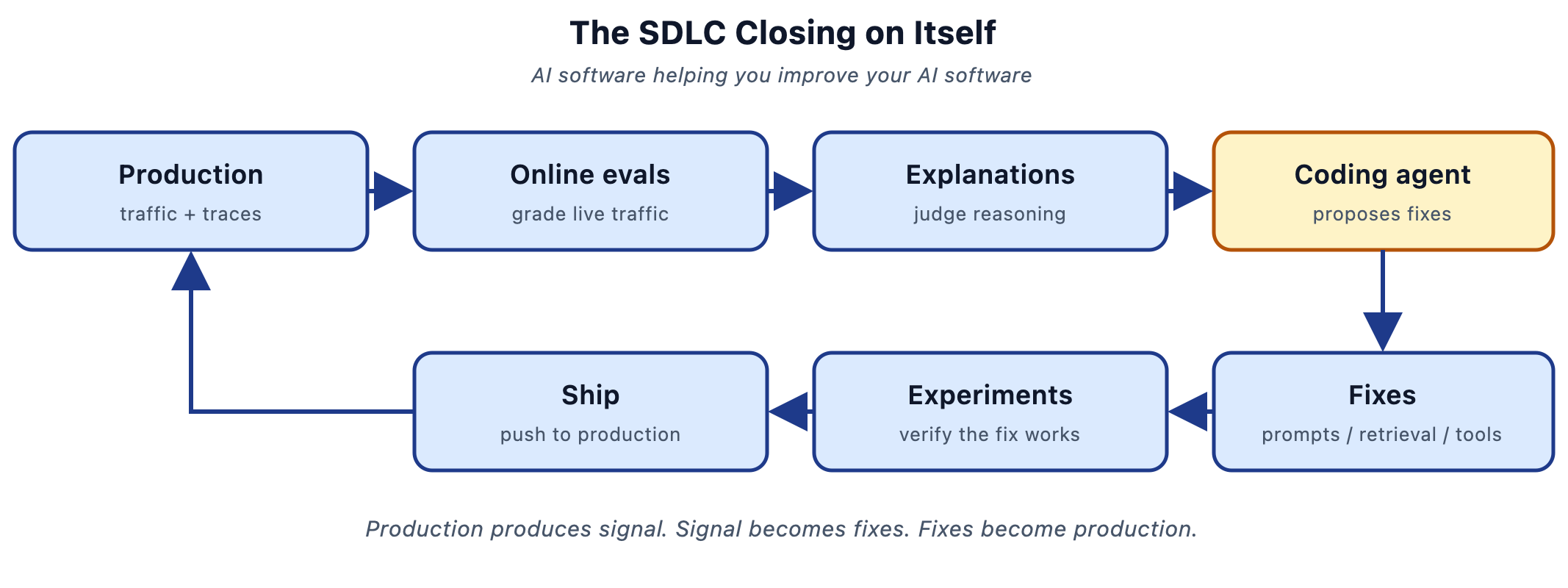
One more thing: feeding evals
to a coding agent
- Export failing traces + explanations from AX
- Hand them to Claude Code or Cursor as context
- "Find the patterns. Propose fixes."
- Then verify with an experiment
How that works
Keep the loop honest
- Feed it your requirements, not just the failures
- Find themes, not one-off failures
- Always verify with an experiment before shipping
The SDLC closing on itself
What we built today
Instrument → trace → read data → eval → validate → iterate → ship → monitor
Start small
Evals are infrastructure
- Treat evals as a core part of your system, not an afterthought
- The value compounds — but only if you keep investing
Go try it
- arize.com — start a free trial
- arize.com/docs/ax — the docs
- npx skills add Arize-ai/arize-skills
Thank you!
@seldo.com on BlueSky
Get a free year! Upgrade with code
ARIZEAIE2026
From Vibes to Production - Arize 101 (AIEWF)
By Laurie Voss